
Travel intelligence / Digital essentials
Your VPN works at home.
What happens when you land?
A Shanghai stopover, a Dubai video call and a Bangkok hotel login ask different things of your connection. Choose your international travel VPN around the country, the device and what you actually need to do.
Check your destination first ↓Affiliate disclosure: EpicLayover may earn a commission through links marked “Affiliate link.” Other provider links are direct official links. As an Amazon Associate, we earn from qualifying purchases.
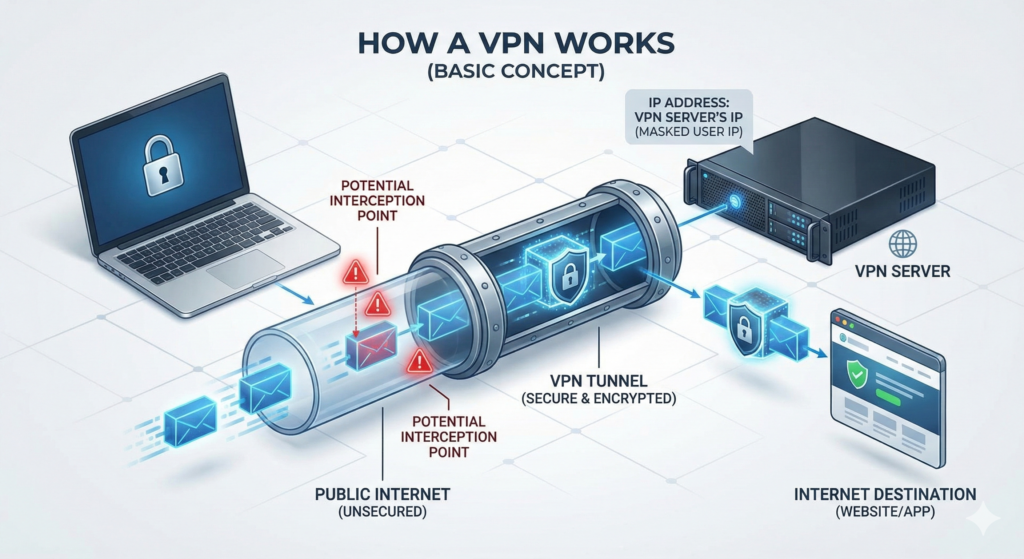
HTTPS already encrypts traffic between your browser and a website. A VPN adds a separate encrypted connection to a VPN provider and changes the public IP address websites see. It is useful for extra network privacy, but does not prevent phishing, fix a compromised device or replace account security. You are also choosing a provider to trust.
[1]Destination intelligence
Where you travel changes the decision
Country rules, provider availability and the behavior of one airport network are three separate things. This is a sourced planning guide, not a live connection test or a legal clearance.
“Asia” is not one firewall. A trip to Tokyo or Seoul should not automatically use the same connection plan as mainland China. Equally, a café in London can filter a site even when the country does not prohibit your VPN. Choose the network problem first, then the product.
For ordinary stays in the US, UK, much of Europe, Japan or South Korea, our starting checklist is practical: device support, dependable reconnection, nearby servers and account access. This is an editorial use-case recommendation, not a guarantee that every service is available or every use is permitted.
| Destination | What the source establishes | What to do with that information |
|---|---|---|
| Mainland ChinaApp blocking + VPN restrictions | Google, Facebook, YouTube and X are among the services blocked. UK advice describes government licensing requirements; US advice warns VPN use is illegal in most cases.[12][19] | Read the China plan below. Do not treat a working app, a foreign subscription or a provider’s marketing page as permission to use it. |
| United Arab EmiratesRegulated VPN uses + internet calling | TDRA permits corporate VPN access to internal networks, while restricting services that bypass filtering. Voice and video calling services require licensing or approval.[23] | For Dubai or Abu Dhabi, arrange an approved calling option. A WhatsApp message working does not establish that a voice call will work or is permitted. |
| RussiaBlocked services + mobile disruption | UK advice notes blocked social networks and possible loss of mobile data/SMS with foreign SIMs; local SIM registration can be difficult.[24] | Save offline contacts and account recovery methods. A VPN subscription cannot fix a SIM that cannot get online. Check the full travel advisory before planning a visit. |
| IranFiltering + possible shutdowns | UK advice warns that internet and mobile services may be slowed or cut without warning, nationally or locally.[25] | Plan navigation and check-ins that do not depend on a particular app. A VPN still needs a functioning path to a reachable server. |
| Türkiye / TurkeyeSIM-service access restrictions | UK advice states that access to some eSIM services is restricted. This does not mean that every installed eSIM loses data service.[28] | Ask the provider separately about purchase, installation, app access, top-ups and data connectivity. Prepare the supported setup before your Istanbul connection. |
| VietnamSelective filtering + limited privacy | UK advice warns of website/social-media restrictions and possible inspection of device content; many social sites are ordinarily available.[27] | Test the exact work and messaging apps you need. Do not assume every traveler needs a special stealth configuration, or that a VPN hides files stored on the phone. |
| IndiaProvider obligations + server location | CERT-In’s directions address records kept by covered VPN service providers; its FAQs distinguish consumer-style VPN services from enterprise/corporate VPNs.[29] | Check the provider’s privacy policy and physical hosting location. An Indian IP address or “virtual India” location is not proof of an India-based physical server, nor an exemption from applicable law. |
| EgyptDocumented service blocking | OONI documented blocking of Proton and Proton VPN websites on several Egyptian networks in 2023. That study does not establish today’s app success on every network.[30] | Check current provider support for the exact app. Website blocking, app downloads and a working VPN tunnel are separate tests. |
| PakistanDisruption during unrest | UK advice warns that mobile data and internet can be cut without warning during protests or civil unrest.[31] | Confirm current provider and regulatory requirements before departure; this table does not declare all VPNs legal or illegal. Save transport details offline. |
| MyanmarVPN possession risk + device checks | New Zealand’s official advice says having a VPN is illegal and phones may be checked.[26] | Treat this as a legal and personal-safety question before choosing technology. Follow current official advice; do not rely on a stealth feature as protection from a device inspection. |
| North KoreaSeverely limited connectivity | UK advice says routine lack of internet/mobile access makes outside communication almost impossible.[32] | This is not a consumer-VPN shopping problem. Review entry restrictions and the full travel advisory; do not plan on a VPN or travel eSIM solving access. |
A blocked VPN website does not prove its installed app fails. A server listed in a country does not prove you can connect from that country. Successful access does not establish legality. Follow the linked official advice for the full destination risk picture, including any advice against travel.
Field guide / Mainland China
China: plan for the moment your usual apps stop loading
The useful question is not “Which VPN wins?” It is “How will I reach my hotel, authenticate my accounts and communicate if my first connection fails?”
Local Wi-Fi, a local SIM and a travel eSIM can behave differently
A Shanghai airport connection and a roaming eSIM may use different internet routes. Roamless says its China eSIM routes through its international network and provides access to services including Google and WhatsApp without a separate VPN. That is a provider claim about its mobile-data route, not EpicLayover testing and not a claim about the hotel’s Wi-Fi. Confirm coverage, your exact plan and supported apps before purchase.[22]
Switching back to hotel Wi-Fi changes the connection. If an app works on mobile data but fails on Wi-Fi, that difference can be routing or filtering—not necessarily an expired account. Neither roaming nor a VPN makes your device immune to inspection or changes the rules governing your activity.
What the providers actually say
NordVPN: its Windows support page currently says both app and manual connection configurations have been blocked in China. Other devices have separate guidance. We still feature NordVPN for general travel, but we do not recommend buying it as a guaranteed China connection.[20][21]
Proton VPN: its China guidance describes Stealth and alternative routing, while explicitly acknowledging that reliability cannot be guaranteed. These are connection techniques, not permission to use a restricted service. Review current rules before deciding whether they are appropriate for your trip.[11]
Before departure: make your essentials independent of one app
- Agree on a backup contact method. Ask your hotel or driver what they use, record a telephone number with country code, and save the pickup instructions.
- Save the destination in Chinese and English. Keep the hotel address, booking confirmation and airport-transfer details available without an internet login.
- Prepare account recovery. Know which services require an SMS code, whether your home number can receive it abroad, and where your recovery codes are stored securely.
- Check your data plan and phone. Confirm carrier unlock, eSIM support, destination coverage, hotspot policy and when validity starts. Install permitted apps and updates while you still have dependable access.
- Reduce sensitive data carried on the trip. Review employer requirements for work devices. US advice notes the lack of network privacy and discusses using travel-only electronics without sensitive information.[19]
You have tested your login, subscription and device setup. You have not tested that device on a Chinese network. Keep support instructions available offline and avoid relying on any single subscription for time-critical access.
Know what you are buying
VPN features: what solves your problem?
A longer feature list is only useful when you understand the tradeoffs. “Stealth,” “Secure Core” and “Onion over VPN” solve different problems.
| Feature | Useful travel job | Limit to understand |
|---|---|---|
| Modern VPN protocol | Carries the encrypted tunnel. Start with the app’s recommended automatic mode for an ordinary hotel or airport connection. | WireGuard-based protocols, OpenVPN and provider variants are not a speed ranking. A blocked endpoint can defeat an otherwise sound protocol.[33] |
| Obfuscation / Stealth | Changes how VPN traffic appears to some filtering systems. Consider it when an otherwise working connection blocks VPN traffic. | It is not invisibility. NordWhisper and Proton Stealth are documented options; local rules still apply. NordWhisper cannot be combined with NordVPN Onion Over VPN.[3][11][50] |
| Kill switch / always-on | Can stop traffic using the ordinary connection after a tunnel drops—useful when moving between airport Wi-Fi and mobile data. | Accidental disconnect, manual disconnect, reboot and server change can behave differently. Proton documents Apple-platform limitations; verify your actual app settings.[34] |
| Split tunneling | Lets selected apps or destinations travel outside the VPN; sometimes useful when a bank or local service rejects the tunnel. | Excluded traffic is outside that VPN’s protection. Proton’s macOS feature is experimental with WebKit limitations; its listed platforms do not include iOS. Do not assume Android instructions apply to an iPhone.[35] |
| Secure Core / multi-hop | Routes through more than one VPN server. Proton describes Secure Core as reducing risks from a compromised exit server. | Additional routing can add delay. It is different from Tor and does not by itself make an app available in China.[36] |
| DNS protection | Keeps name lookups inside the intended protected path when the app and OS support it. | A connected badge is not a complete leak test. Check the provider’s app-specific documentation, including DNS and IPv6 behavior.[34] |
| No-logs policy / audit | Helps assess what a provider retains and what an external reviewer actually inspected. Read the report’s date, scope and findings. | No browsing logs does not mean no billing or account records. An audit is evidence about a defined period and scope, not a permanent guarantee.[37][38] |
| RAM-only / encrypted disks | Different approaches to data storage on servers. Proton describes full-disk encryption, so a universal “RAM-only” checkmark would misstate its design. | Neither architecture proves a VPN bypasses censorship, defeats live surveillance or makes you anonymous. Evaluate the whole privacy model.[37] |
| Dedicated IP / Smart DNS | A dedicated IP is a consistent address; Smart DNS changes selected DNS/routing behavior rather than supplying a full VPN tunnel. | Neither guarantees banking or streaming access. Check whether your chosen product actually encrypts the traffic you want protected.[13][48][49] |
Privacy jurisdiction is one factor, not a shield
“Outside the 14 Eyes” is not enough to establish a product’s safety. Consider the company’s legal obligations, account data, server operations, published audits and how you use the device. An account you log into can identify you regardless of the VPN’s headquarters.[33]
Featured VPN / Browsing privacy
NordVPN
Our featured option for everyday travel privacy. Compare its app features and test it on your devices. For China, read the device-specific connection limitations below before buying.
Check NordVPN plans ↗Affiliate link · VPN serviceFeatured eSIM / Mobile data
Roamless
Our featured mobile-data option for getting maps, messages and bookings online between stops. Country routing matters as much as coverage; read the China eSIM explanation below.
Explore Roamless data ↗Affiliate link · Mobile-data serviceStart with your trip
A shortlist that fits how you travel
Choose your main need. This is a decision aid based on documented features, not a speed test or a guarantee of access.
Compare the useful differences
Six VPNs worth comparing
Compare device allowances, plan options and the tradeoffs that matter on a trip. Choose the features you will actually use.
| Provider | Useful starting point | Simultaneous connections | Check before buying |
|---|---|---|---|
| NordVPN | Everyday phone + laptop use | Up to 10[2] | App-specific features |
| Proton VPN | Free option or paid upgrade | Free: 1 / Plus: 10[4] | Free-plan limitations |
| Surfshark | Many household devices | Unlimited[5] | Renewal and household terms |
| ExpressVPN | Choice of subscription tiers | 10 / 12 / 14 by tier[7] | Extras you actually need |
| CyberGhost | Alternative for a smaller setup | Up to 7[8] | Platform and device needs |
| Bitdefender VPN | Existing security-suite users | Standalone Premium: up to 10[9] | Data cap vs Premium access |
Device limits and features checked against provider documentation on October 27, 2026. On a phone, swipe the table to see every column.
Check the amount charged today, subscription length, renewal price, taxes and refund conditions. A long prepaid plan may cost more overall than a monthly plan for one short trip.
01 / Featured VPN / Everyday travel
NordVPN
A practical starting point for a phone-and-laptop traveler who wants a mainstream VPN with several connection options.
NordLynx, NordWhisper and a kill switch are documented features. NordWhisper is available on Windows, Android, Linux, iOS and macOS.[2][3]
Before you choose: For China, read the device-specific support notice above. For everyday use, test reconnection and the kill switch on your phone and laptop. A featured placement is not a country-access guarantee.Before you choose: Kill-switch behavior differs by app. Check the exact version you install rather than assuming every device has identical settings.
Check NordVPN plans ↗Affiliate link02 / Free plan or privacy-focused upgrade
Proton VPN
Start with the free plan for one device, or compare Plus when you need more devices and control over your connection.
Free includes unlimited data and limited server selection. Plus adds more location choices and features such as Secure Core and streaming support.[4]
Before you choose: Secure Core and Tor over VPN serve different needs. Tor over VPN is a paid feature and does not reproduce Tor Browser’s anti-fingerprinting protections. Read the advanced section below.Before you choose: A free account is not the same product as Plus. Check the plan and platform before expecting paid features.
Compare Proton plans ↗Affiliate link03 / Families and many devices
Surfshark
Worth comparing when your travel group brings several phones, laptops and tablets.
Unlimited simultaneous connections apply across its VPN plans. Bypasser and NoBorders are documented features, with support depending on the app.[5][6]
Before you choose: Unlimited devices does not mean unlimited Wi-Fi speed. Check household-use terms and the full renewal price.
View Surfshark plans ↗Official provider link04 / Compare the subscription tiers
ExpressVPN
Another mainstream option to compare, particularly if you are deciding between VPN-only needs and bundled extras.
Basic allows 10 simultaneous VPN connections, Advanced 12 and Express Pro 14. Included extras depend on the tier and subscription duration.[7]
Before you choose: You may not need the higher tier. Compare the total charge, renewal term and the features you will actually use.
View ExpressVPN plans ↗Official provider link05 / An alternative for up to seven devices
CyberGhost
A further option for travelers whose device count fits within its allowance.
CyberGhost currently documents seven simultaneous connections across supported platforms.[8]
Before you choose: Choose it for the features available on your devices, not a promise that every streaming service or restricted network will work.
View CyberGhost plans ↗Official provider link06 / Check the plan you already own
Bitdefender VPN
Already using Bitdefender? Review what your subscription includes before paying for another VPN.
Standard generally includes 200 MB per device per day; Small Office Security has a different quota. Premium adds unlimited traffic and server selection. Standalone Premium supports up to 10 simultaneous devices.[9][10]
Before you choose: Bitdefender does not support VPN installation on routers. Split tunneling exists on supported apps, including Windows. The partner button opens the general store: select and confirm the VPN product.
Check Bitdefender products ↗Affiliate linkOn the road
Six situations a generic VPN ranking misses
Start with the symptom. Work out whether the obstacle is connectivity, account security, network policy or national restrictions.
Bangkok hotel: Wi-Fi says connected, but nothing loads
You need the room booking or an airline app, and the VPN keeps reconnecting.
Complete the hotel’s genuine captive portal first. A kill switch may be doing its job by blocking access before the tunnel exists. Briefly pause only as needed to sign in to the venue network, then reconnect and restore the setting. Never install an unknown certificate or “security app” from a login page.
What matters: A new subscription cannot fix an unfinished Wi-Fi login.
Dubai stopover: messages send, but the family call fails
Your family sees texts but cannot hear you on the usual app.
Check the UAE’s currently approved calling services or use a permitted carrier calling option. Arrange this before departure rather than assuming a VPN makes every voice service usable or permitted.
What matters: A messaging app and its calling feature can have different restrictions.
Tokyo hotel: the bank challenges your login
You must pay a bill or confirm a transaction before the next flight.
Use the official bank app and its verification process. If the VPN is rejected, consider your own cellular connection; use split tunneling only if supported and appropriate. Avoid rapidly hopping between countries. Keep a second way to authenticate.
What matters: Changing your IP does not change your identity, card details or the bank’s checks.
Lisbon workday: the company VPN will not connect
You have a call in twenty minutes and both personal and work VPN apps are running.
Follow your employer’s approved setup and ask IT about conflicts. Use the permitted connection method and test conferencing before the meeting. A personal VPN cannot grant access to an employer’s systems.
What matters: Remote-work reliability needs IT approval and a backup network, not extra layers by default.
Istanbul connection: the eSIM app will not open
You planned to buy data after landing but cannot reach the provider’s app or site.
Check supported purchase and installation steps before traveling. Save setup instructions, support details and a backup plan; distinguish app/store access from whether an already installed plan can use a local network.
What matters: Do not wait until the transfer desk to find out how top-ups work.
Family trip: one phone is sharing data with three devices
The phone’s VPN says connected, so everyone assumes the laptop and tablets are covered.
Check whether the phone actually shares the VPN tunnel. Install the app on each supported device, or use a correctly configured VPN-capable router if that suits your setup. Confirm hotspot support and data limits.
What matters: A private Wi-Fi network and an active VPN tunnel are different protections.
Illustrative travel situations, not claimed field tests. Supporting guidance: [13][14][23][28][35]
Solve the actual problem
Connected, but something still won’t work?
Buying another subscription is not always the answer. Start with the symptom.
The hotel or airport Wi-Fi login page will not open
Confirm the network name with the venue. Open the device’s Wi-Fi “sign in” prompt and complete the venue’s login page first. If the VPN or kill switch prevents that page from loading, briefly pause it for the login, then reconnect the VPN before normal browsing. Do not enter sensitive account details while troubleshooting.
A Wi-Fi icon only means you have joined a network; it does not confirm working internet access.[14]
My banking app blocks me while the VPN is on
Some services reject known VPN IP addresses or inconsistent location signals. Try the bank’s official app on your own cellular connection, and follow its account-verification steps. Repeatedly switching countries may create more checks.
Split tunneling can exclude an app or site on supported platforms, but that traffic then travels outside the VPN. Do not assume the same setting exists on every phone.[13]
Streaming works at home but not in my hotel
Streaming services can block VPN connections and use location signals beyond your IP address. Access depends on the service, subscription, network and current restrictions. Follow the service’s terms, check provider support and download eligible content before departure when possible.[13]
The connection is slow or keeps dropping
Check whether the underlying Wi-Fi or mobile data works without the VPN. Then try a nearby server or the app’s automatic protocol setting. A VPN cannot create bandwidth that the hotel network does not have. If you change a kill-switch setting to troubleshoot, restore it afterward.
I need work access, not just a personal VPN
Use the connection method approved by your employer. A commercial travel VPN does not replace a corporate VPN, and running both can create conflicts. Ask IT about your destination, authentication method and a backup connection before you leave.
Public Wi-Fi / Local restrictions
When cafés, libraries and airports filter content
A block on one venue’s Wi-Fi does not automatically mean the country blocks that site.
Public networks can restrict streaming, games, social media, adult content or other categories. Some use DNS filtering; others block IP addresses, inspect traffic patterns or limit bandwidth. If a VPN tunnel is allowed, it can sometimes carry requests beyond a local filter. The network can also block the VPN itself. A failed connection does not tell you which method is in use.[33]
Use a short diagnosis
- Confirm the network. Ask staff for the exact name and login procedure. A VPN does not certify that an airport hotspot is genuine.
- Finish the access step. A tunnel does not buy airline Wi-Fi, accept venue terms or replace a captive-portal login.
- Compare connections. If permitted, see whether the same service works on your mobile data. A difference points to the network path, but does not by itself prove censorship.
- Respect the venue’s policy. For permitted activity, use provider-supported connection options or your own mobile data. Do not install unknown profiles or use someone else’s credentials to reach a site.
Encryption can limit what a local network sees inside the tunnel. It cannot make a phishing page trustworthy, prevent someone watching your screen, or guarantee that your VPN use is undetectable. A slow lounge connection also stays slow when its underlying bandwidth is exhausted.
Advanced privacy / Tor and the dark web
Tor, onion services and dark-web monitoring
Reading censored reporting, using a legitimate onion service and receiving a stolen-password alert are different tasks. Choose the right tool for the task.
Three terms that get mixed together
- Deep web
- Ordinary content search engines do not index, such as your private booking account or email inbox. It does not require Tor.
- Dark web / onion services
- Services reached through specialized networks. Tor onion services use .onion addresses; legitimate uses include private publishing and communication. The label does not establish whether a site is trustworthy.
- Dark-web monitoring
- A service that looks for exposed account data and alerts you. It does not browse onion sites on your behalf, erase leaked data or prevent every breach.
What Tor Browser changes
Tor Browser routes browsing through the Tor network and includes protections against browser fingerprinting. For ordinary websites, traffic passes through relays and an exit; the website sees the exit address. Onion services operate within Tor and do not use that normal public-web exit path. An ordinary VPN alone does not give Chrome access to .onion addresses.[39][47]
Legitimate travelers may need independent reporting or a publisher’s secure contact service. Get the service’s onion address from the organization’s own verified website and follow its published instructions. A directory listing is not verification. You do not need dark-web access to protect an ordinary hotel booking or read a breach alert.
| Approach | What it provides | What it does not establish |
|---|---|---|
| Tor Browser | Tor routing plus browser-specific privacy protections. Available for supported desktop systems and Android. | It does not automatically route every app on your device through Tor. There is no official Tor Browser for iOS; the Tor Project describes limitations of the alternative Onion Browser.[39][42][41] |
| Proton Tor over VPN | Paid-plan Tor servers route supported traffic from the VPN into Tor, with access to onion services. | Using a normal browser this way does not add Tor Browser’s fingerprinting defenses. Tor carries TCP, not all traffic types; expect slower browsing.[44][39] |
| NordVPN Onion Over VPN | A specialty-server route into Tor. NordVPN documents accessing onion services through a regular browser. | This is separate from Dark Web Monitor. NordWhisper does not support Onion Over VPN servers; do not assume those modes stack.[45][3] |
| VPN + Tor Browser | Two tools configured together, with a different set of parties able to observe parts of the connection. | It is not automatically safer. The Tor Project generally advises against combining them unless you understand how to avoid undermining privacy.[40] |
Is Proton the “best VPN for the dark web”?
Proton has documented Tor integration and published privacy evidence, so it deserves a substantive comparison. But those features do not establish a universal winner. Its Tor routing is a convenience feature; Tor Browser is designed for a different browser-privacy problem. For routine privacy, a normal VPN connection may be all you wanted. For sensitive reporting or source protection, follow a specialist security plan rather than an affiliate ranking.
Proton publishes annual no-logs audit reports. Read the actual scope and date. “No logs” refers to specified activity and connection data; it does not mean the company has no account information or that an account you visit cannot identify you.[38][37]
What stays exposed
Logging into a personal account identifies you to that service. A downloaded document opened in another app may make connections outside Tor. Plain HTTP to a normal website lacks the end-to-end protection HTTPS provides. Extra browser extensions can weaken the intended protections.[41]
Tor also has limits against an observer who can watch both ends of a connection and correlate timing. A VPN, Tor or a virtual machine is not a promise of safety against a powerful adversary or a compromised device.[43]
NordVPN Dark Web Monitor: useful for a different problem
NordVPN says its monitoring feature looks for exposures associated with your email and other added assets, then sends alerts. Verify which assets and monitoring tier your subscription covers. An alert does not mean the VPN tunnel failed, and no alert does not prove your accounts are safe.[46]
If an alert arrives while traveling: open the provider’s app or the affected service directly, change the exposed password, replace reused passwords, review active sessions, and enable two-factor authentication. Contact the bank directly if payment details or transactions are involved. You do not need to visit the dark web to take those steps.[15]
A five-minute departure check
Set it up before the airport
Tap each item as you finish. Progress stays on this open page and resets when you reload.
Get online first
Start with Roamless. Compare your data options.
A VPN needs an internet connection. These mobile-data services help you get online; compare them separately from your VPN subscription.
Featured mobile-data option
Roamless for the journey between stops
Roamless supports pay-as-you-go credits and data plans through the same eSIM. That makes it worth comparing for a journey with several stops or an uncertain data budget. Check the rates and coverage for every country on your itinerary.
[16]Affiliate link. Requires a compatible, carrier-unlocked eSIM phone. Check activation rules and plan validity before departure.
Airalo
Compare mobile-data plans for your destination. Check coverage, data allowance, validity and hotspot terms against the rest of your shortlist.
Compare Airalo plans ↗Affiliate link · Travel eSIM
Saily
Another travel eSIM option to compare for your route. Saily requires its app to install the eSIM, so complete setup while you have a reliable connection.
[17]Explore Saily plans ↗Affiliate link · Travel eSIM
Drimsim
Compare its travel SIM and eSIM options. Check the format you are buying, device compatibility, destination rates and any delivery or activation requirements.
[18]Check Drimsim options ↗Affiliate link · SIM / eSIM
Compare the same countries, travel dates and expected data use. Check compatibility, network coverage, activation timing and total price. You do not need subscriptions to every service listed.
Need a separate hotspot?
First see whether your phone’s hotspot is enough. A separate mobile hotspot can be useful for several devices, but it is not automatically a VPN router.
View the RoamWiFi hotspot ↗Amazon affiliate link. Check the exact model, country coverage and data costs.
Plan the whole connection
Compare airport Wi-Fi, mobile data and hotspots before adding another device or subscription to your bag.
Read the global connectivity guide →eSIM, hotspot and travel router: buy only what your setup needs
An eSIM installs a cellular subscription profile on a compatible device. A data-only plan may not supply a local telephone number or the SMS codes your bank needs. Verify those features rather than assuming they are included.
A phone hotspot shares the phone’s internet connection with other devices, subject to plan and device limits. It does not automatically share the phone’s VPN. Family members should check their own protection and connection allowances.
A portable cellular hotspot connects through its own supported data arrangement. Buying one does not automatically make it use the travel eSIM on your phone. Confirm the exact model, bands, SIM/eSIM support and data charges.
A travel router shares an upstream connection such as hotel Ethernet, Wi-Fi or tethering. A VPN-capable model can route supported traffic through a configured VPN, but you must check client support, kill-switch behavior, captive portals and whether your employer permits it. A router still needs internet access.
For a solo traveler carrying a phone and laptop, test phone tethering before buying another device. For a family or remote-work setup, a router may simplify connections—but it adds something else to power, update and troubleshoot.
Quick answers
What travelers ask before buying
What is the best VPN for international travel?
There is no universal winner. Start with NordVPN or Proton VPN Plus for a phone-and-laptop shortlist, compare Surfshark for many household devices, and check Proton Free if you only need one connection. Use the comparison to confirm limits, platform features and total cost.
Is a free VPN enough for a short trip?
It can be. Proton Free offers unlimited data on one simultaneous connection, with limited server selection. Check its limitations before expecting paid streaming features or several connected devices. A free plan’s privacy policy and restrictions matter more than the word “free.”[4]
Does a VPN make public Wi-Fi completely safe?
No. HTTPS already protects connections to most websites, and a VPN adds protection between your device and its server. Neither makes a fraudulent website trustworthy or stops you from giving a password to a scammer. Keep devices updated and use two-factor authentication.[1]
Will a VPN work in China or another restricted destination?
Do not buy based on a blanket promise. Check current rules and provider guidance for the specific destination. Connection success can change, and anti-censorship features do not guarantee access. See the destination reality check.[11][12]
Does a VPN give me cheaper flights or hotels?
There is no guaranteed saving. Compare the final total with the same dates, baggage, currency, taxes and cancellation terms. Avoid buying a VPN solely because someone promises cheaper travel prices.
Do I need a VPN if I use an eSIM?
An eSIM supplies connectivity; a VPN changes how supported traffic is routed and adds an encrypted tunnel to the VPN provider. You may choose both, but a VPN does not activate an eSIM, increase its data allowance or guarantee access to blocked services.
Does my phone’s VPN automatically protect devices on its hotspot?
Do not assume so. Sharing a connection and sharing a VPN tunnel are different features. Check the phone and provider documentation; installing the VPN directly on each supported device is the clearer option when your subscription allows it.
Can I use NordVPN and Roamless together?
Yes, when supported and permitted: Roamless supplies mobile data and NordVPN creates its tunnel over that connection. They do different jobs. Verify the data plan, app and destination; neither subscription guarantees every service will be reachable.
Does Roamless mean I do not need a VPN in China?
Does dark-web monitoring let me access the dark web?
No. It looks for exposed data and alerts you. Tor Browser and Tor-routing features address access and browsing privacy; NordVPN’s Dark Web Monitor addresses a different need. See the full Tor and dark-web section above.[46]
Do stealth servers make VPN use invisible?
No. They can change recognizable traffic patterns, but connection success and detectability depend on the network and technique. They do not hide an installed app from a device inspection or create permission to use it.
Choose the fit. Test it before you fly.
Match the device allowance, check the total price and keep a backup connection.
Find your airport guide
Plan the practical side of your next connection.
Explore the layover directory →Travel safety checklist
Review the wider essentials for your journey.
Open the safety checklist →Travel toolkit
Find other services that fit your trip.
Explore the toolkit →Evidence / Updated October 27, 2026
Sources and editorial method
Country statements use official travel advice and regulators where available. Product features come from provider documentation; OONI supplies a dated network-measurement example. The travel plans are editorial recommendations based on those sources. This article does not claim in-country VPN tests, speed benchmarks or an independent security audit.
Commercial claims are attributed to the provider, and technical access is kept separate from legal permission. Recheck country advice and app-specific support before departure. Featured affiliate partners are NordVPN and Roamless; their placement does not establish superior performance or guaranteed access.
- FTC: public Wi-Fi and HTTPS ↗
- NordVPN: features and device allowance ↗
- NordVPN: NordWhisper availability ↗
- Proton VPN: Free and Plus plans ↗
- Surfshark: simultaneous devices ↗
- Surfshark: app feature availability ↗
- ExpressVPN: subscription tiers ↗
- CyberGhost: simultaneous devices ↗
- Bitdefender: VPN limits and compatibility ↗
- Bitdefender: split tunneling on Windows ↗
- Proton VPN: connection limitations in China ↗
- UK travel advice: China, safety and internet access ↗
- ExpressVPN: apps and sites that block VPN connections ↗
- ExpressVPN: connected Wi-Fi without internet ↗
- FTC: two-factor authentication ↗
- Roamless: pay-as-you-go and data plans ↗
- Saily: installing the eSIM app ↗
- Drimsim: SIM and eSIM options ↗
- US State Department: China technology and VPN risks ↗
- NordVPN: current Windows connection issues in China ↗
- NordVPN: China guidance by device ↗
- Roamless: China eSIM routing and coverage (provider claims) ↗
- UAE TDRA: internet, VPN and VoIP guidelines ↗
- UK travel advice: Russia communications and restrictions ↗
- UK travel advice: Iran communications shutdowns ↗
- New Zealand travel advice: Myanmar VPN possession and phone checks ↗
- UK travel advice: Vietnam internet censorship ↗
- UK travel advice: Turkey eSIM restrictions ↗
- India CERT-In: cybersecurity directions and FAQs ↗
- OONI: measured blocking of Proton websites in Egypt (2023 study) ↗
- UK travel advice: Pakistan communications disruptions ↗
- UK travel advice: North Korea internet and mobile access ↗
- EFF: choosing a VPN and its privacy limitations ↗
- Proton VPN: kill-switch behavior and platform limitations ↗
- Proton VPN: split tunneling by platform ↗
- Proton VPN: Secure Core architecture ↗
- Proton VPN: no-logs policy and account-data distinction ↗
- Proton VPN: published no-logs audit reports ↗
- Tor Project: how Tor Browser works ↗
- Tor Project: guidance on combining Tor Browser and a VPN ↗
- Tor Project: browser safety and anonymity limitations ↗
- Tor Project: installation and iOS limitations ↗
- Tor Project: traffic correlation and remaining attacks ↗
- Proton VPN: Tor over VPN, paid plans and traffic support ↗
- NordVPN: Onion Over VPN ↗
- NordVPN: Dark Web Monitor and exposure alerts ↗
- Tor Project: onion-service routing ↗
- ExpressVPN: Smart DNS does not encrypt traffic ↗
- NordVPN: dedicated IP definition ↗
- NordVPN: current obfuscated-server instructions ↗